I will keep it short in simple steps, if this works please comment below so others can follow
1. Go to the website below and navigate to your CPanel:
https://ap.www.namecheap.com/ProductList/HostingSubscriptions
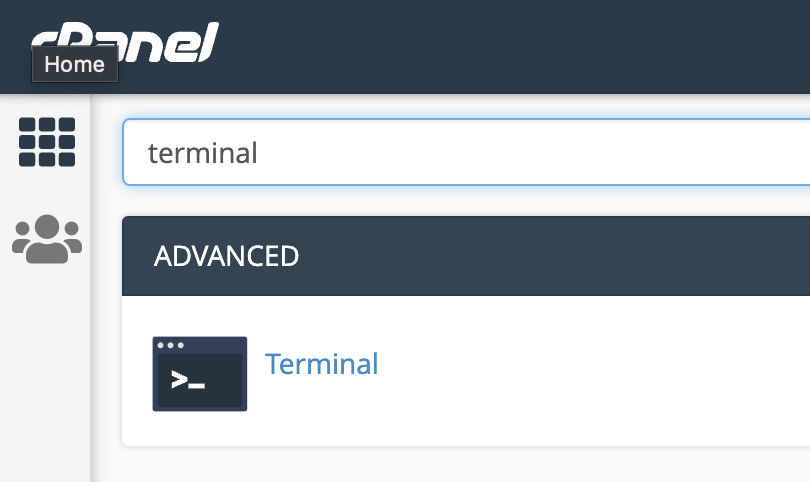
2. In the search box on the top, find “Terminal”. Note: if you don’t have Terminal, you need to chat with support and ask them to enable Terminal/SSH access. It’s not enabled by default.
curl https://get.acme.sh | sh
.acme.sh/acme.sh –issue -d yourweb.com -d www.yourweb.com -w /home/youruserfolder/yourwebfolder –server letsencrypt
If you’d rather pay for this
Let’s Encrypt is free, it auto-renews, and for a personal site that is the end of the discussion. There are three cases where paying is the saner answer.
The first is identity. A DV certificate — which is all Let’s Encrypt issues — proves you control the domain and nothing else. If you need an organisation name validated behind the padlock, that is an OV or EV certificate and it is only sold. The second is a warranty: paid certificates carry one, free ones do not. Whether that matters to you is a business question, not a technical one. The third is simply not wanting to own the renewal — a basic DV certificate from a registrar runs single-digit dollars a year, and managed hosting that provisions and renews SSL for you removes the cron job from your life entirely.
One warning if you stay on the free path, because it is the failure I have actually hit: a certificate can renew perfectly on disk for years and never be served, because nothing installed it into the web server. The renewal log looks healthy the whole time. Check what the site is actually serving, not what the renewal said.
Part of shared hosting, SSL and WordPress — the SSL and certificates section.