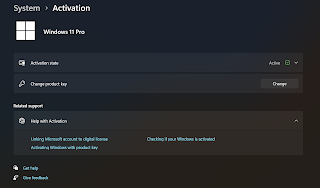
Long story short, I wanted to update to Windows 11 Pro so I can remote access into my computer without using any third party application. But, I kept getting the stupid error (0x803FA071 – 0xC004F069 – 0x80070490), and it does not accept the key.
After struggling for a while here are 2 options you can fix:
– Start the re-installation again with Windows 11 Pro ISO
– Or force the key to use dummy key and change that
If you don’t have time like me, I just went with option 2. Now how to do it:
1. Try disconnecting from the internet (do this, or you will screw up again)
2. entering the generic Windows 11 Pro product key (VK7JG-NPHTM-C97JM-9MPGT-3V66T) in the Activation settings to force an edition change
3. It will install a lot of required stuff, but don’t connect yet, let it do it work.
4. Restarting and reconnecting to the internet to activate with your purchased key.
5. Now to go the activation again, enter your Windows 11 Pro key.
Hope that helps!